
Salesforce Lead Management · Built for RevOps Teams
Salesforce Lead Routing Software for Instant Lead Assignment
Stop losing inbound leads to slow queues. LeadAngel powers Salesforce lead management automation with real-time routing based on territories, ownership, availability, and custom rules, without Apex code.
- GDPR & SOC 2 Compliant
- Live in Under 3 Hours
- No Apex Code Required
- Rated 4.5 ★ on
Trusted by Salesforce teams at growing B2B companies







Why Salesforce's Native Assignment Rules Fail Growing RevOps Team
Salesforce gives you the building blocks for lead assignment—Flow Builder, assignment rules, and queues. But if you’ve tried to scale them, you already know the problem: they’re rigid, sequential, and impossible to maintain as your team grows. Here’s what RevOps teams hit every day
Leads go cold
A rep is on vacation or in a meeting. The lead sits in their queue for hours—or days. By the time someone calls, the prospect has already talked to a competitor.
Rules break when teams change
Every time you hire, fire, promote, or reorganize, someone has to manually update dozens of assignment rules. One wrong rule and entire lead segments go to the wrong team — silently.
Routing Without Visibility
Salesforce won't tell you why a lead was assigned to a specific rep, whether the SLA was met, or if a lead was rerouted. Debugging a routing problem takes hours of investigation.
Can't do real round-robin
Salesforce's native round-robin doesn't check rep availability, respect assignment caps, or handle weighted distribution. Fair assignment is impossible without custom Apex triggers.
ABM leads get lost
A lead from an existing account gets assigned to a random SDR instead of the account owner. The AE finds out three hours later, when the prospect already had a bad experience.
Routing System Overload
Salesforce allows only one active lead assignment rule at a time. Every use case, every team, every campaign has to live in that one ruleset—creating a maintenance nightmare.
LeadAngel is built to solve every one of these problems — inside Salesforce, without replacing it.

Benefits
What LeadAngel Adds to Your Salesforce Lead Routing
LeadAngel is a Salesforce-native lead management platform. It sits inside your existing Salesforce org and gives your RevOps team a powerful, visual routing engine that goes far beyond what native assignment rules can do—without writing a single line of Apex code.
Real-Time Lead Assignment Rules
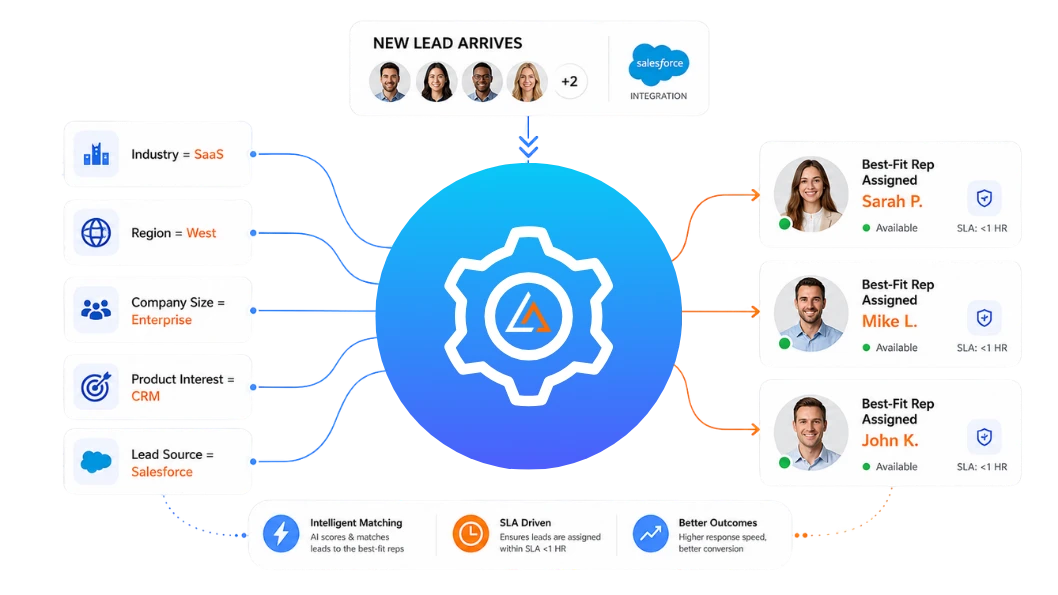
Create drag-and-drop routing rules based on any Salesforce field — industry, geography, lead source, score, or custom fields. LeadAngel instantly routes every lead to the right rep or team.
Weighted and Standard Round-Robin Routing
Distribute leads fairly with standard or weighted round-robin routing. LeadAngel respects rep availability, skips OOO reps, supports assignment caps, and prevents uneven workloads.
Account-Based Routing — Send Leads to the Right Owner
LeadAngel matches incoming leads to existing accounts, opportunities, or customers in Salesforce and routes them directly to the correct owner or AE.
Territory-Based Routing
Route leads by geography, industry, company size, or custom territory rules. LeadAngel automatically assigns leads to the right territory owner with built-in fallback logic.
SLA Enforcement and Auto-Reassignment
Set response-time SLAs for inbound leads. If a rep misses the SLA, LeadAngel sends alerts, reassigns the lead, and logs the activity automatically.
SDR-to-AE Real-Time Handoff
Enable instant SDR-to-AE handoffs without delays. AEs can join live calls immediately or receive automated meeting bookings.
Routing Visibility and Full Audit Trails
Track every routing decision with complete visibility into assignments, SLAs, lead history, and rep activity for better reporting and transparency.
Multi-Router Support
Build separate routing workflows for inbound, partner, event, or re-engagement leads. Each router works independently for easier management and testing.
How LeadAngel Automates Lead Routing Inside Salesforce
Every lead that enters Salesforce deserves more than a queue. LeadAngel delivers intelligent, real-time routing that puts the right rep on every opportunity, the moment it arrives. Smarter assignments, zero delays, and a revenue engine firing on all cylinders.
1
Lead Enters Salesforce
A lead arrives from any source: web form, Marketo, Pardot, Zoom webinar, chat, API, or manual entry. LeadAngel triggers instantly on lead creation or update.
2
Routing Rules Evaluate in Real Time
LeadAngel checks the lead against your routing logic: lead-to-account match, territory rules, qualification criteria, rep availability, and assignment caps — in the correct priority order, in under a second.
3
Lead Assigned, Rep Notified, SLA Clock Starts
The lead is assigned to the right rep. An instant notification goes out via email, Slack, or SMS. The SLA timer begins. If the rep doesn't respond in time, auto-escalation kicks in automatically.
Want Automated Lead Routing in Salesforce?
Book a demo to see how LeadAngel automates lead assignments for faster follow-ups.
Comparison
LeadAngel vs. Salesforce Native Routing
LeadAngel is a Salesforce-native lead management platform. It sits inside your existing Salesforce org and gives your RevOps team a powerful, visual routing engine that goes far beyond what native assignment rules can do—without writing a single line of Apex code.
| Feature | Salesforce Native | LeadAngel |
|---|---|---|
| Visual drag-and-drop routing | ✗ Text-based rules only | ✓ |
| Real-time round-robin routing | ✗ Basic rotation only | ✓ |
| Weighted round-robin | ✗ | ✓ |
| Rep availability & OOO routing | ✗ | ✓ |
| SLA enforcement & auto-reassignment | ✗ | ✓ |
| Lead-to-account matching | ✗ | ✓ |
| Territory-based routing | Limited | ✓ |
| Account-based routing | ✗ | ✓ |
| SDR-to-AE real-time handoff | ✗ | ✓ |
| Multiple independent routers | ✗ | ✓ |
| Partner/channel lead routing | ✗ | ✓ |
| Routing visibility & audit trails | Minimal | ✓ |
| No Apex code required | Partial | ✓ |
| Implementation time | Weeks to months | Under 3 hours |
| Salesforce AppExchange listed | N/A | ✓ |
What Teams See After Implementing LeadAngel
9x
Higher chance of conversion when a lead is contacted within 5 minutes of form fill, LeadAngel makes sub-minute assignment the standard.
< 3 hours
Average implementation time for LeadAngel in a Salesforce org. Most teams are live and routing leads before their first weekly standup post-purchase.
100%
All assigned leads are logged with full routing context: who received them, why, and whether the SLA was met—zero black-box routing.
Read Our Blogs

There was a time when B2B sales ran on instinct and spreadsheets. CRMs held only basic details. “Get More Leads”
Stop Wasting Time: The Inefficiency of Using Flow Builder for Serious Lead Routing You’ve probably heard it a hundred times

Can you believe Kubaru is one of the most widely used native Salesforce lead assignment tools… and yet so many

Have you ever tried to book a meeting and ended up confused by too many choices? When there are too

If you’re building a revenue engine inside Salesforce, chances are you’ve heard of Traction Complete. It’s a popular system for

Data enrichment isn’t just a nice-to-have—it’s a critical step in the data wrangling process, and every sharp business leader knows
Fequently asked questions

You can update routing rules in LeadAngel at any time by visiting your routing dashboard. To do this, log into your account and select the routing workflow you would like to edit.
Once the routing page opens, you’ll see all of your existing assignment conditions and routing logic. You can then add new rules, remove outdated conditions, or adjust settings like territories, account ownership, round robin assignments, or rep availability.
After your changes are complete, simply click the save button to apply the updated routing rules across your CRM workflows.
Salesforce assignment rules work well for simple routing setups. More advanced workflows often require additional flexibility and maintenance.
This platform supports account matching, territory routing, weighted round robin, and multi-condition routing logic from a single interface.
The platform connects directly with Salesforce and works alongside existing CRM workflows. Routing activity and ownership updates sync automatically with Salesforce records.
Teams can continue managing leads inside Salesforce while using more advanced routing automation in the background.
Salesforce Flows are built for general workflow automation. Routing processes can become difficult to manage as logic grows more complex.
A dedicated routing interface makes it easier to update assignment rules, manage territories, and monitor lead distribution without rebuilding workflows.
Unavailable reps can be automatically skipped during lead assignment. This keeps leads moving without delays.
You can also create backup routing rules. Leads can be reassigned based on schedules, territories, or round robin logic
Pricing depends on your team size and routing needs. Some teams need simple lead assignment. Others need advanced territory management and account matching.
Most lead routing platforms offer flexible pricing plans. Many teams request a demo or custom quote before getting started.